
Close Menu
    • Contact us
    • About us
    • Write for us
    • Sitemap
    Friday, October 9
    • Tech
      • Tech Updates
    • Networking
      • Internet
    • Software
    • Social Media
      • Twitter
    • Apps
      • Android
      • App Reviews
      • iOS
    • Web Hosting
      • Web Development
      • Web Design
    Home»Reviews»Movavi Photo Editor Review: Easily Fix and Transform Photos
    Reviews

    Movavi Photo Editor Review: Easily Fix and Transform Photos

    Rachel SummersBy Rachel SummersMay 28, 2018Updated:October 5, 2022No Comments3 Mins Read
    Facebook Twitter Pinterest LinkedIn Tumblr Email
    Share
    Facebook Twitter LinkedIn Pinterest Email

    Being able to edit photos is extremely useful, and will enable you to fix any photos that you snap and transform them to make them look more impressive. However if you’ve never edited photos in the past, you may struggle to use most of the editors that you try.

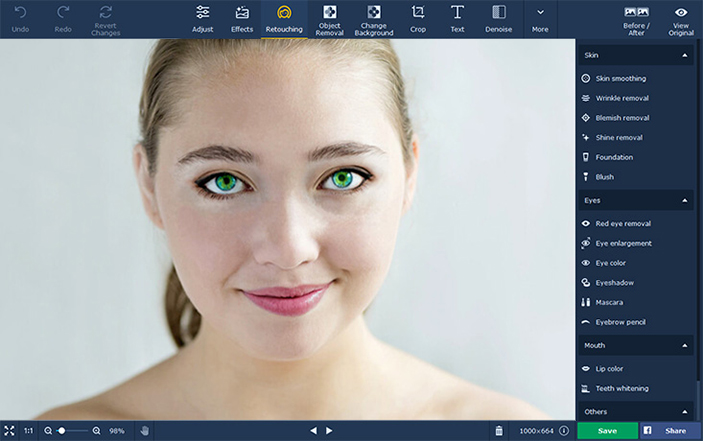
    Rather than fighting an uphill battle against a steep learning curve, you should give Movavi Photo Editor a try. It is a photo editor for PC that has made a name for itself due to its intuitive and user-friendly approach.

    Unlike other editors, you won’t need any prior experience to take advantage of Movavi Photo Editor. The clean and simple user interface will make it easy to explore its features, and you can experiment and figure out how those features work in a matter of minutes.

    Image result for Movavi Photo Editor Review: Easily Fix and Transform Photos

    In short you will be able to jump right in and start to edit your photos immediately using Movavi Photo Editor, and will be able to master its features in no time. As you do that you’ll find that you’re able to:

    • Enhance the quality of photos to increase their clarity and make colors more vivid by either manually or automatically adjusting the color settings.
    • Transform the frame of photos by cropping or leveling it, or alter its orientation by flipping or rotating it.
    • Remove any unwanted objects or other elements from photos while ensuring that no remnants or imperfections are left behind.
    • Delete the background from a photo and either leave it transparent or add a new image.
    • Apply various types of artistic filters to give photos a unique style of their own.
    • Restore old black and white photos by removing cracks and stains, reducing noise, flattening creases, and more.
    • Touch up portraits by applying digital makeup, hiding blemishes, smoothening wrinkles, and more.
    • Insert text elements along with stickers that can be customized to create unique captions, titles, or watermarks.

    Make no mistake there are many other features in Movavi Photo Editor, and the ones listed above are just the tip of the iceberg. That being said they should help to illustrate exactly how it can help you to fix and improve your photos in order to transform them so that they match any vision that you can dream up.
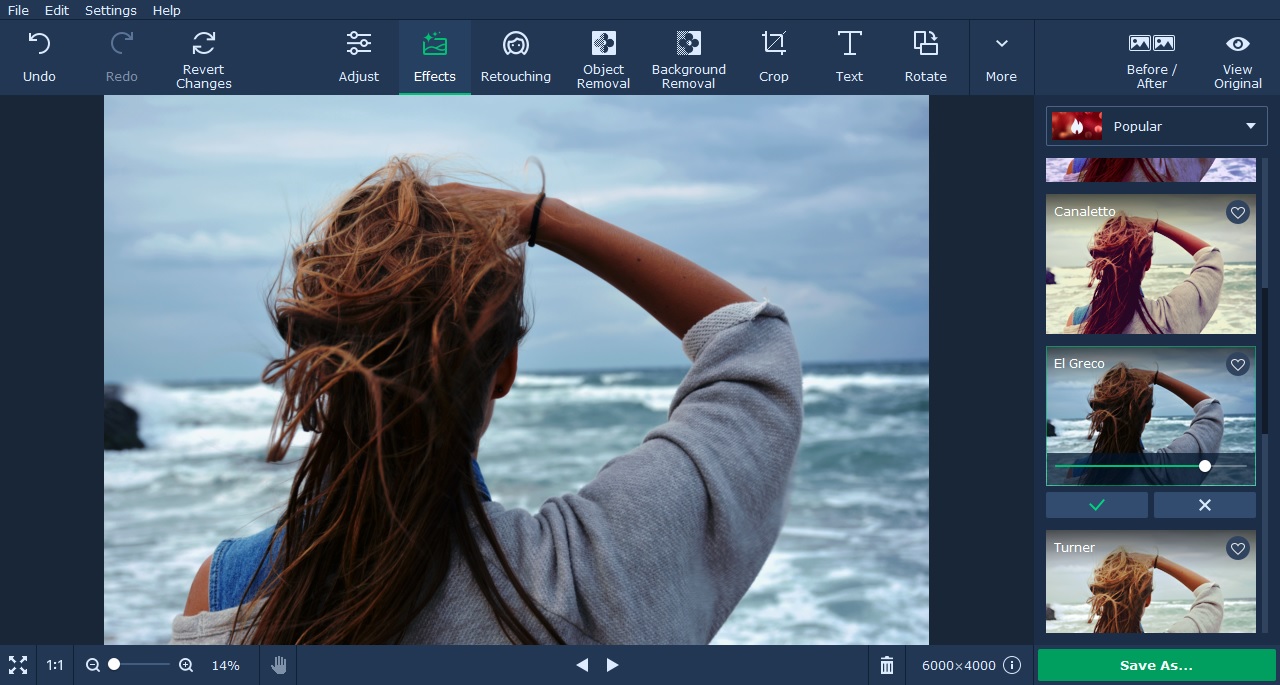
    Image result for Movavi Photo Editor Review: Easily Fix and Transform Photos

    Assuming you want to be able to edit your photos but have avoided it in the past because of how complicated it appears – trying Movavi Photo Editor would be a good first step. It will provide you with a very different experience of photo editing, and let you unleash your creativity without having to worry about any of the technical aspects that are normally associated with editing.

    Movavi photo editor photo editor for PC photo editor software
    Share. Facebook Twitter Pinterest LinkedIn Tumblr Email
    Rachel Summers
    • Facebook
    • X (Twitter)

    Rachel Summers has been a social media manager for seven years. She has experiencing working for companies both big and small, including Student Writing Services, an experienced custom writing service. In her free time Rachel offers advice to small and start-up businesses on their social media engagements. See more related articles on her blog.

    Related Posts

    COTI is a SCAM! Honest review!

    September 12, 2018

    Brand Owners: Here’s Why You’d Better Be Tracking Your Product Reviews

    September 11, 2018

    Sony’s Top Smartphones, Reviewed

    June 14, 2018

    Comments are closed.

    Top Picks
    Social Media

    Turning Public Instagram Activity Into Structured Relationship Context

    By WatsonOctober 2, 20260

    Most social-media analytics tools are built for marketers. They tell you about reach, engagement rate,…

    SEO

    Why Wikipedia Page Creation Is More About Research Than Writing

    By Derek HalesSeptember 30, 20260

    Creating a Wikipedia page may look like a writing project from the outside. There is…

    Tech

    Virtual Dedicated Server Explained: Resources, Control, and Cost

    By Lisa JacksonSeptember 25, 20260

    As websites and applications scale, shared hosting eventually prohibits providing resources and business control. Consequently,…

    Internet

    Navigating Options for Community Internet Providers and Bulk Residential Internet

    By Uchenna Ani-OkoyeSeptember 25, 20260

    Modern living increasingly relies on a stable and high-capacity digital connection. As residents look for…

    Web Design

    How Anchorage Web Design Supports Ongoing Website Hosting And Maintenance

    By Naman ModiSeptember 17, 20260

    A website needs more than an attractive first launch. Reliable performance depends on careful design…

    • Contact us
    • About us
    • Write for us
    • Sitemap
    © 2026 kapokcomtech.com Designed by kapokcomtech.com.

    Type above and press Enter to search. Press Esc to cancel.