
Close Menu
    • Contact us
    • About us
    • Write for us
    • Sitemap
    Saturday, August 1
    • Tech
      • Tech Updates
    • Networking
      • Internet
    • Software
    • Social Media
      • Twitter
    • Apps
      • Android
      • App Reviews
      • iOS
    • Web Hosting
      • Web Development
      • Web Design
    Home»Technology»Private IP Addresses
    Technology

    Private IP Addresses

    Carrie BonoBy Carrie BonoMay 23, 2017Updated:October 5, 2022No Comments2 Mins Read
    Facebook Twitter Pinterest LinkedIn Tumblr Email
    Share
    Facebook Twitter LinkedIn Pinterest Email

    In today’s world being a tech and internet savvy is a must. And if you are just beginning up with your new internet connection let us have some basic knowledge about it. For using the internet you need to have a router and a modem. A router is a device which provides your PC or phone the Local Area Network (LAN) while the modem connects the internet to your PC or phone or whatever you might be using.  While most of the people get confused regarding the difference between a modem and a router, you need to be very clear.

    Knowing about the address

    Every router comes with its own IP address. An IP address is a combination of numbers and dots that uses a set of rules called protocol to help communicate on the internet.  The IP addresses are of different types. They can be for private internet connection routers or they can be for some special work guided routers. These special IP addresses are also called as Bagon IP addresses.  These IP addresses are prohibited for public domain uses. One such is IP address 192.168.1.254. Usually IP addresses are for tracking the person, using internet and sharing and receiving data over the internet, sitting at any part of the world. But as the Bagon IP addresses are not created for the use of general public at their private access capable, tracking them becomes a little difficult.
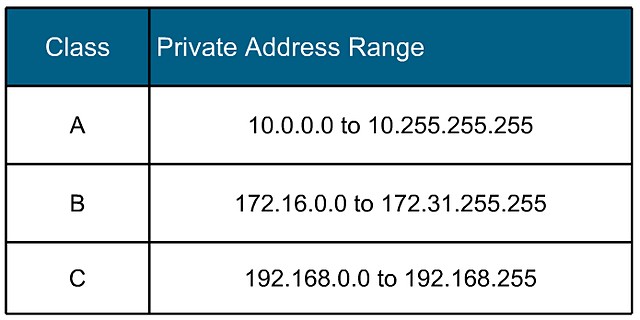
    Image result for Private IP Addresses

    The uses

    IP address 192.168.1.25 is not allowed on the public internet and this is as per the guidelines of the RFC 1918 (Request For Comment 1918). This is just a method for assigning private users with IP addresses. If a private user has to access internet from a router with such IP address as 192.168.1.25, it needs to have a gateway, proxy server. Such a gateway helps to connect your private address to a public address providing local area network (LAN). A proxy server acts like a hub and transfers information to the host computer. An IP address such as the one we are discussing, IP address 192.168.1.254, has a limited access to information as well, on record.

    Share. Facebook Twitter Pinterest LinkedIn Tumblr Email
    Carrie Bono

    Related Posts

    Detail Sanders for DIY Home Projects: What to Look For and Why It Matters

    July 24, 2026

    Why UAE Contracting Businesses Are Moving to Specialist ERP: The Financial and Operational Case

    July 24, 2026

    How Advanced Website Optimization Improves Long-Term Search Performance

    July 16, 2026

    Comments are closed.

    Top Picks
    Apps

    What Turns a Good App Idea Into a Product People Keep Using

    By Sandy GetzkyJuly 31, 20260

    Entering the market with a new app is akin to venturing into a bustling city…

    Business

    The Hidden Business Costs of a Website Breach Beyond Data Loss

    By Kristel StaciJuly 27, 20260

    Typically, when companies think about website security, the immediate worry is usually data loss. Customer…

    SEO

    Comparing Google Maps Scraping With Manual Local Research

    By Maddie DavisJuly 27, 20260

    You already understand the difference between automated collection and hands-on fieldwork. My goal here is…

    Security

    How Accurate Is Facial Recognition Search With Public Photos?

    By Danish MerajJuly 26, 20260

    You already know that face-based search can be powerful. What you want is a clear…

    Tech Updates

    Siri AI and the Future of Seamless Experiences Across Apple Devices

    By Elaine BennettJuly 25, 20260

    For years, Apple Siri was the assistant you used to set a timer or skip…

    • Contact us
    • About us
    • Write for us
    • Sitemap
    © 2026 kapokcomtech.com Designed by kapokcomtech.com.

    Type above and press Enter to search. Press Esc to cancel.